
Tsveta van Son
August 28, 2026
Read time:
min

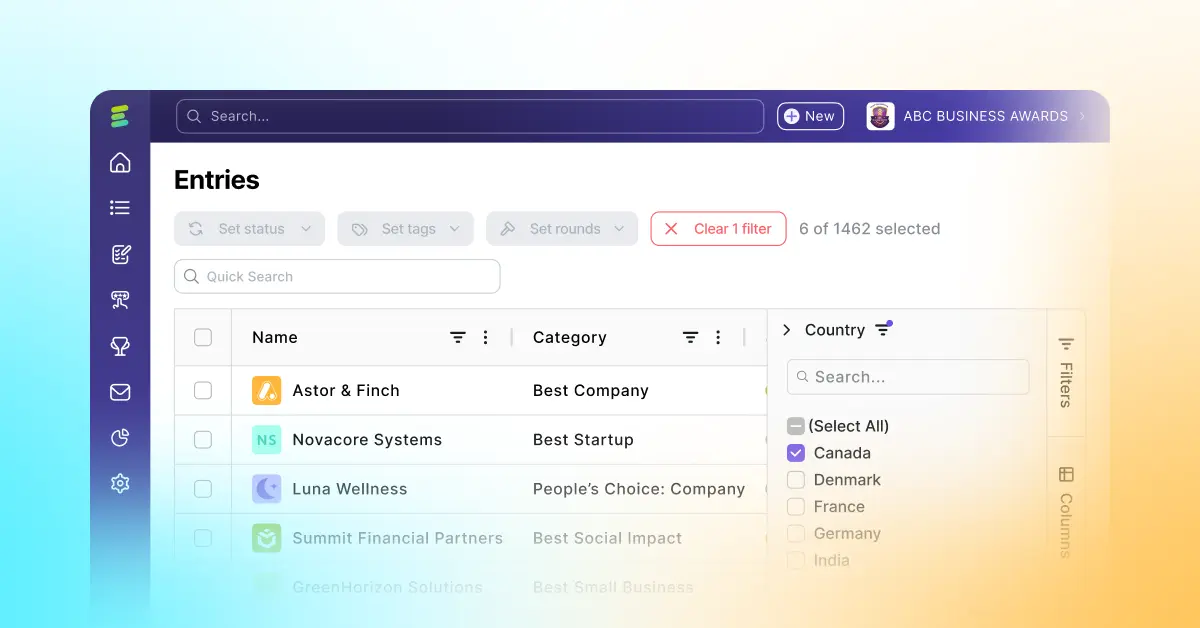
Since Evalato 2.0 rebuilt entry management from the ground up, we've kept building on top of it. Today's update is aimed squarely at the people who live in Registrations and Entries every day: it turns those tables from record-keeping views into a powerful analysis tool.
Here's what's new.
Registrations and Entries now show all the fields collected on your forms — as real, filterable columns. The only fields left out are the ones that don't make sense in a table view: long-text questions, video uploads, and similarly bulky field types.
Practically, that means you're no longer limited to filtering by the handful of default fields. If your form collects country, company size, or category type, you can filter by it. Running a global program and want to see every entry from Iceland? Now it's a filter, not a search.
Columns configuration also gets a serious upgrade, with three additions working together:
Put together, you can go from a raw entry table to a real statistic — average entries per category, total submissions by country, score range by judge — without exporting anything to a spreadsheet.
One thing worth revisiting: these features are only as useful as your data is consistent. Grouping and filtering by "Country" works best when "Country" is the same field, with the same settings, across every form in your program.
If your forms haven't been standardized yet, this is a good moment to fix that. Evalato has supported reusing fields across multiple entry forms for a while now, and it's exactly what makes grouping, aggregation, and pivots worth using. The more common fields your forms share, the more meaningful your data gets — and the less cleanup you'll do later.
Both features are live now. Head into Registrations or Entries to try filtering and grouping on your own data, or book a demo if you'd like a walkthrough.

Launch your next awards program in Evalato in record time.
Or book a free personalized demo to see how it works.



.png)